这两天访问自己的blog站点一直报“500 Internal Server Error”错误,但是进后台管理界面却是正常的,因此变成只能写文章却没办法看到文章的样子。
向Dreamhost的技术支持寻求帮助,回信告知是因为资源管控的原因,说我的站点中某些脚本超过资源限制了。
The issue appears to be one of resource usage. Looking at the logs, it
appears some scripts under your user are being killed by our process
watcher program. Each time this happens, it results in a 500 error on
the site that crosses the limit. This keeps the CPU/Memory load balanced
for all users on the server.
按照技术支持的建议,在站点的access.log中寻找是否有大量频繁访问的搜索引擎爬虫,结果发现Yahoo每天会产生数千次的访问。实际上我认为2900多次访问并不应该造成什么资源超限,但是DH技术支持认为就是这个问题。并且建议在.htaccess文件中屏蔽这个IP,说这样站点就可以访问了。
but in the last rotation, this was how many times Yahoo hit:
2921 67.195.111.26
This is WAY too much, so I suggest you follow the instructions in the
bots and spiders article I sent you. Also, you can block that IP via
.htaccess for the time being, and it should bring your site back up.
在.htaccess文件中添加了”deny from 67.195.111.26″,但是目前为止,在access.log中看到来自67.195.111.26的访问仍然在不断增加,而访问dbform.com也仍然报500 Internal Server Error。
Update@2009-12-2
DH技术支持帮忙又修改了.htaccess文件,然后说现在问题不在Yahoo爬虫过多了,是因为wp-login.php产生了什么什么问题,让我根据某篇文档再去调优一下Wordpress。
That isn’t getting rid of your 500 errors tho. It looks like the login
page is coming up tho:
https://www.dbform.com/wp-login.php
If you can log in, go ahead and apply the tips outlined here:
http://wiki.dreamhost.com/Fine_Tuning_Your_WordPress_Install
Make sure to pay special attention to the bit on caching.
都是些安装Plugins啥的,预计到没什么作用,但是还是安装了DB_Cache插件,目前仍然报500错误。
Update@2009-12-3
仍然在跟DH技术支持反复的邮件沟通中,排除了其它在DH虚拟主机中的站点的资源占用问题,确认就是dbform.com域名中的内容引起的。
For your domains, what I found was as follows:
+Checking dbform.com on HTTP service for ‘Premature End of Script
Headers’ errors…ok! Found 3540 error(s) for dbform.com in the domain’s
HTTP error.log
The “Premature End of Script Headers” error is what shows up in the
access logs when procwatch kills a process. That being said, in just
today alone there’s been 3540 kills, so it looks like dbform.com is your
problematic domain that needs to be worked on.
但是,甚至在删除了所有的plugins,并且使用了最简单的theme,访问主页仍然会报500 Internal错误,让人崩溃。
在WP2.6之后有了revision功能,如果多次修改文章将会产生大量的revision,可能导致mysql检索时间过长,因此删除了所有的revision。
DELETE FROM wp_posts WHERE post_type = "revision";
但是,删除以后,也仍然无法正常显示主页,杯具啊。
DH技术支持一直说就是dbform.com占用了过多的CPU和RAM,因此php.cgi程序总是被他们的procwatcher杀掉,所以每次访问会报500 Internal error,说升级到Dreamhost PS就不会出现这种问题,DH PS是一个单独的虚拟主机,独享所有的CPU和RAM资源,费用是每月10M内存1美元,也就是如果这个单独的虚拟主机独享150M内存的话,每个月要多交15美元,但是最初一周是免费的,并且有高达2300M内存独享。实在懒得再跟他们费口舌,也想知道我这个简单的dbform.com到底他妈的需要多高的内存资源,就真的shared host撑不住了?于是升级到DH PS,反正第一周免费,看了再说。
使用了DH PS以后就会有资源消耗统计,到目前为止已经统计了9个小时,最多的内存需求量不过200M,可是我可以有2300M的内存限额。
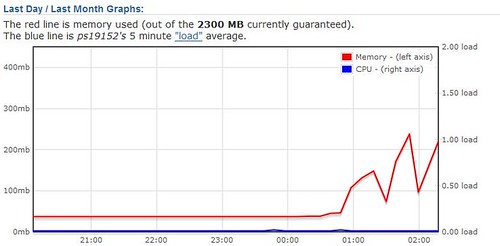
但是页面仍然报500 Internal Error,这次看DH技术支持怎么解释。
Update@2009-12-4
总算在经过5天以后,我的dbform.com又回来了!
最后DH的技术支持仔细检查了我的站点,发现wp-blog-header.php被入侵了。
you will see that your wp-blog-header.php file has been hacked.
This is what is breaking your site.
在文件开始挂了很长一段木马代码,将这个文件用正确的文件替换以后,页面终于可以显示了。
这段木马应该是在11月23日我说站点出现问题的时候就被挂上了,只是那时候我只想到要检查theme文件夹中的文件,而没有检查主目录下的文件。
不管如何,dbform.com, welcome back. 🙂