依然是优先发布了再Linux平台上的Oracle Database 11gR2。在OTN上的下载页面可以看到包含了比以前更多的内容,而有些仅仅是称呼发生了变化。
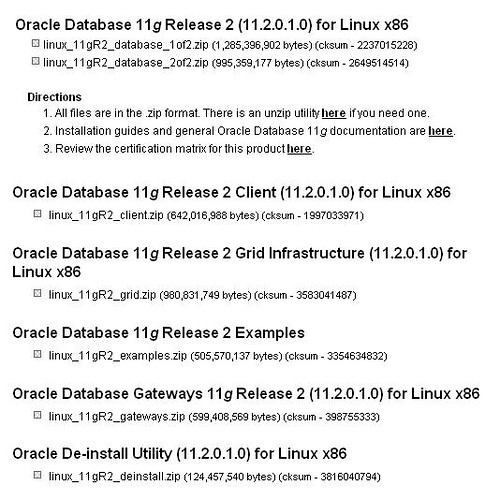
1. Database安装盘变为了2张,之前的版本一直只有1张,11gR1的安装盘容量为1.8G,而11gR2已经超过2G。解压两个zip文件到同一个database目录下,再运行runInstaller进行数据库安装。
2. Client安装盘比以前容量更大了,但是可以认为基本上变化不大。
3. Grid Infrastructure安装盘应该就是之前的Oracle Clusterware安装盘,但是容量明显增加,从之前的300M到现在900M,我自己还没有下载完毕,所以具体增加了哪些内容还不知道,有已经安装了的给些注解吧。在之前需要用dbca创建的ASM实例功能,已经挪动到Grid Infrastructure安装中,也同时包括了Oracle Clusterware以及ASMFS等群集相关软件的安装。
4. Examples安装盘就是以前的Companion,内容也应该就是之前的Oracle Express的那些内容。
5. Gateways安装盘基本上没有变化。
6. De-install Utility安装盘是全新的内容,从字面上看应该卸载安装的一些工具,莫非将Universal Installer做了专门的产品?具体内容等下载完毕再见分晓。
Update@2009-09-28
对于De-install Utility,在Oracle11gR2的Installation Guide中有如下一段介绍。
Deinstallation Tool
Oracle Universal Installer no longer removes Oracle software. Use the new Deinstallation Tool (deinstall) available on the installation media before installation as well as in the Oracle home directory after installation.
Run this tool from ORACLE_HOME first. It is located in:
$ORACLE_HOME/deinstall.
An error occurs if there are any missing files and the tool prompts you to download the standalone version available in the deinstall directory on the installation media.
实际上在安装完Oracle Software之后,$ORACLE_HOME/deinstall就已经存在了,基本上是一个字符界面的完全删除安装的工具,按照提示运行完deinstall将会删除包括ASM、database instance、software、oraInventory以及oraInst.loc在内的所有内容,基本上是一次非常干净的反安装。