How to resolve ORA-15025 when creating ASM diskgroup on Solaris

操作系统版本:Solaris10 Sparc 64bit
数据库版本:Oracle 10.2.0.4

在创建ASM Diskgroup的时候出现如下图报错。
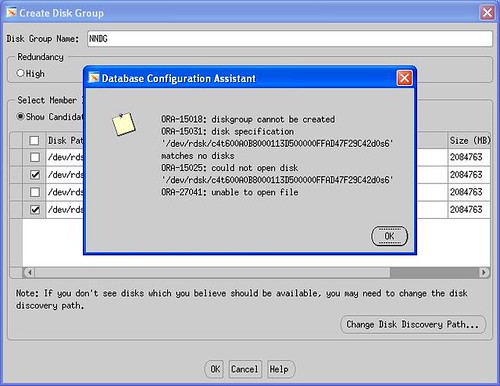
creating ASM diskgroup on Solaris10

检查当前系统裸设备的设置。

partition> p
Current partition table (original):
Total disk cylinders available: 53154 + 2 (reserved cylinders)

Part      Tag    Flag     Cylinders         Size            Blocks
  0       root    wm       0                0         (0/0/0)              0
  1       swap    wu       0                0         (0/0/0)              0
  2     backup    wu       0 - 53153        1.99TB    (53154/0/0) 4269595050
  3 unassigned    wm       0                0         (0/0/0)              0
  4 unassigned    wm       0                0         (0/0/0)              0
  5 unassigned    wm       0                0         (0/0/0)              0
  6        usr    wm       0 - 53153        1.99TB    (53154/0/0) 4269595050
  7 unassigned    wm       0                0         (0/0/0)              0

注意到被使用的裸设备d0s6的扇区划分是从0开始的,这在Solaris操作系统中将会导致Oracle无法读取该裸设备,因此引发了上面的错误。

解决方法是分配出一小部分空间给其它分区。比如分配100M给d0s3。

partition> p
Current partition table (unnamed):
Total disk cylinders available: 53154 + 2 (reserved cylinders)

Part      Tag    Flag     Cylinders         Size            Blocks
  0       root    wm       0                0         (0/0/0)              0
  1       swap    wu       0                0         (0/0/0)              0
  2     backup    wu       0 - 53153        1.99TB    (53154/0/0) 4269595050
  3 unassigned    wm       0 -     2      117.66MB    (3/0/0)         240975
  4 unassigned    wm       0                0         (0/0/0)              0
  5 unassigned    wm       0                0         (0/0/0)              0
  6        usr    wm       3 - 26112     1000.06GB    (26110/0/0) 2097285750
  7 unassigned    wm       0                0         (0/0/0)  

再次重新创建ASM磁盘组,成功。

How to identify the cluster name

在为RAC环境配置database control的时候,会被问及cluster name,当然我们知道默认安装的Oracle Cluster Name就是crs,但是如何确认到底CRS的名字是什么呢?

[oracle@dbserver1 oracle10g]$ emca -config dbcontrol db -cluster -EM_NODE dbserver1 -EM_SID_LIST intertol2,intertol3,intertol4

STARTED EMCA at Jul 27, 2009 4:20:25 PM
EM Configuration Assistant, Version 10.2.0.1.0 Production
Copyright (c) 2003, 2005, Oracle.  All rights reserved.

Enter the following information:
Database unique name: intertol
Database Control is already configured for the database intertol
You have chosen to configure Database Control for managing the database intertol
This will remove the existing configuration and the default settings and perform a fresh configuration
Do you wish to continue? [yes(Y)/no(N)]: Y
Listener port number: 1521
Cluster name:

实际上Oracle提供了一个实用程序cemutlo来获取cluster name。

[oracle@dbserver1 ~]ORA_CRS_HOME/bin/cemutlo -h
Usage: /u01/app/oracle/product/crs/bin/cemutlo.bin [-n] [-w]
        where:
        -n prints the cluster name
        -w prints the clusterware version in the following format:
                 ::

[oracle@dbserver1 ~]$ cemutlo -n
crs

另外还有使用ocrdump命令或者ocrconfig命令来间接获得cluster name的方法,详细参看《怎么查安装CRS时设置的cluster name》

4 Nodes Oracle10g RAC on Linux x86-64

用时两天给客户安装完了4节点的Oracle10g RAC on Linux x86-64,使用了OCFS2存储数据文件以及ocr和voting disk。概括一下碰到的问题。

1. 基本上完全按照Oracle官方安装文档,但是其中kernel.shmall内核参数的设置,如果按照默认值2097152的话,最多只能使用到8G内存,当配置SGA过高的时候,就会在启动实例的时候报错。

SQL> startup nomount 
ORA-27102: out of memory
Linux-x86_64 Error: 28: No space left on device

需要将此参数值修改为shmmax/PAGE_SIZE值(通过getconf PAGE_SIZE获取),在此次实施中,客户机器为64G内存,PAGE_SIZE = 4096,因此应该设置kernel.shmall = 16475728。

2. 在安装CRS之前文档中要求运行rootpre.sh,但是却会报“No OraCM running”这样的错误。按照Metalink Note: 405986.1,这个错误可以忽略。

3. 安装CRS最后运行root.sh的时候,报错:
PROT-1: Failed to initialize ocrconfig
Failed to upgrade Oracle Cluster Registry configuration

重新mount OCFS2文件系统之后,再次运行root.sh,故障消失。

umount /u02/oradata/system
mount -L "vol_system" /u02/oradata/system -o nointr,datavolume

4. 服务端的Service Load Balance问题依旧,还是得将remote_listener参数置空之后,才能正常连接。