Unlocking the Power: Key Features of MogDB

Introduction to MogDB

MogDB is a cutting-edge distributed relational database management system that offers an array of powerful features designed to meet the needs of modern businesses. With its high performance, availability, maintainability, compatibility, and AI capabilities, MogDB stands out as a top choice for database administrators, developers, and IT professionals.

One of the key selling points of MogDB is its ability to deliver exceptional performance. This is achieved through various innovative features such as the Cost-Based Optimizer (CBO) optimizer, which intelligently chooses the most efficient execution plans for queries. Additionally, MogDB utilizes a vectorized engine that processes data in batches instead of row by row, resulting in significant performance improvements. The adaptive compression feature further enhances performance by reducing storage requirements and minimizing I/O operations.

In terms of availability, MogDB offers robust solutions to ensure uninterrupted access to critical data. It supports master-slave replication, allowing for automatic failover in case of primary node failure. Logical replication enables real-time data synchronization across multiple databases, while physical backup provides reliable data protection. Delayed replay allows for easy recovery from accidental data corruption or deletion.

Maintaining a database can be complex and time-consuming. However, MogDB simplifies this process with its advanced maintainability features. The grey upgrade feature allows for seamless upgrades without interrupting service availability. Slow SQL diagnosis helps identify and optimize poorly performing queries, improving overall system efficiency. System KPI diagnosis provides insights into system health and performance metrics, enabling proactive maintenance and troubleshooting. Fault diagnosis helps pinpoint issues quickly and accurately.

Compatibility is another area where MogDB excels. It supports various SQL features and ensures compatibility with popular database systems such as Oracle and MySQL. This makes it easier for organizations to migrate their existing applications or leverage their existing SQL knowledge without major modifications.

MogDB also boasts impressive AI capabilities that set it apart from traditional databases. The AI4DB feature enables autonomous database operations, automating routine tasks and optimizing performance based on machine learning algorithms. DB4AI allows for database-driven AI, empowering organizations to leverage their data for advanced analytics and machine learning applications. Additionally, the ABO optimizer intelligently adapts query execution plans based on real-time data statistics, further enhancing performance.

High Performance Features

MogDB is designed to deliver exceptional performance, ensuring that your database operations run smoothly and efficiently. With its cutting-edge features, MogDB offers unparalleled speed and optimization capabilities.

One of the key high-performance features of MogDB is the Cost-Based Optimizer (CBO). This optimizer leverages advanced algorithms and statistical models to determine the most efficient execution plan for queries. By analyzing query statistics and data distribution, the CBO can make intelligent decisions on how to execute queries in the most optimal way. This results in faster query processing times and improved overall performance.

In addition to the CBO optimizer, MogDB also utilizes a vectorized engine. This engine takes advantage of modern CPU architectures by performing operations on entire vectors of data at once, rather than processing individual elements sequentially. As a result, complex queries that involve large datasets can be executed more quickly and efficiently.

Another feature that contributes to MogDB’s high performance is adaptive compression. This feature dynamically adjusts the level of compression applied to data based on its characteristics and usage patterns. By compressing data when it is not actively being accessed or modified, MogDB can reduce storage requirements and improve I/O performance. When data needs to be accessed or modified, it is decompressed on-the-fly for seamless operations.

Parallel query optimization is yet another powerful feature offered by MogDB. This feature allows queries to be divided into smaller tasks that can be executed simultaneously across multiple cores or nodes in a distributed environment. By leveraging parallelism, MogDB can significantly speed up query processing times for large datasets or complex queries.

With these high-performance features combined, MogDB ensures that your database operations are lightning-fast and efficient. Whether you’re running simple CRUD operations or complex analytical queries, you can rely on MogDB to deliver exceptional performance every time.

It’s worth noting that while these high-performance features greatly enhance the speed and efficiency of MogDB, they do not compromise on data integrity or reliability. MogDB is built with a strong focus on ACID (Atomicity, Consistency, Isolation, Durability) principles, ensuring that your data remains consistent and reliable even under high-performance workloads.

High Availability Features

Ensuring high availability is crucial for any database management system, and MogDB excels in this aspect with its robust set of features. Let’s dive into the key high availability features that make MogDB a reliable choice for businesses.

Master-slave replication for data redundancy

MogDB offers master-slave replication, a powerful feature that enhances data redundancy and fault tolerance. With this feature, changes made to the master node are automatically replicated to one or more slave nodes. In the event of a failure or outage on the master node, one of the slave nodes can seamlessly take over as the new master, ensuring uninterrupted service availability. This replication mechanism not only provides data redundancy but also improves read scalability by allowing read operations to be distributed across multiple nodes.

Logical replication for real-time data synchronization

In addition to master-slave replication, MogDB supports logical replication, enabling real-time data synchronization between databases. This feature allows specific tables or even subsets of tables to be replicated from one database instance to another. By capturing and propagating changes at the logical level rather than replicating entire physical blocks, logical replication minimizes network traffic and reduces latency. It enables businesses to maintain up-to-date replicas of their databases for reporting purposes or offloading read-intensive workloads without impacting the performance of the primary database.

Physical backup for data protection

Data protection is paramount in any database system, and MogDB addresses this need through its physical backup feature. With physical backups, administrators can create full copies of their databases at a specific point in time. These backups capture both the schema and data files, ensuring comprehensive recovery options in case of hardware failures, user errors, or other catastrophic events. MogDB’s physical backup mechanism provides flexibility by allowing backups to be stored on different storage devices or even transferred to remote locations for disaster recovery purposes.

Delayed replay for data recovery

MogDB includes a delayed replay feature that allows administrators to recover data from a specific point in time. This feature is particularly useful in scenarios where accidental data deletions or modifications occur and need to be rolled back. By leveraging the transaction log, MogDB can replay changes up until a certain point, effectively restoring the database to its state prior to the incident. The delayed replay feature provides an additional layer of protection against human errors or malicious activities, ensuring that businesses can quickly recover from data-related incidents.

In summary, MogDB offers a comprehensive set of high availability features that guarantee reliability and continuous operation for businesses. The master-slave replication ensures data redundancy and read scalability, while logical replication enables real-time data synchronization for reporting or offloading purposes. Physical backups and delayed replay provide robust data protection mechanisms, allowing administrators to recover from hardware failures or user errors effectively. With these high availability features, MogDB empowers organizations with the confidence that their critical databases will remain accessible and resilient even in the face of unexpected challenges.

*[E-A-T]: Expertise, Authoritativeness, Trustworthiness

Maintainability Features

Maintainability is a crucial aspect of any database management system, and MogDB excels in this area with its array of innovative features. These features are designed to ensure seamless system updates, optimize performance, monitor and analyze system KPIs, and resolve any potential faults. Let’s explore these maintainability features in detail.

One of the standout maintainability features of MogDB is the grey upgrade capability. This feature allows for seamless system updates without interrupting ongoing operations. With grey upgrade, administrators can apply patches, upgrades, or even major version changes to MogDB without causing downtime or disrupting user access. This ensures that businesses can keep their databases up-to-date with the latest enhancements and security fixes while minimizing any potential disruptions to their operations.

Another essential maintainability feature offered by MogDB is slow SQL diagnosis. Slow SQL queries can significantly impact database performance and user experience. MogDB addresses this issue by providing comprehensive tools for identifying and optimizing slow SQL queries. The system analyzes query execution plans, identifies bottlenecks, and suggests optimizations to improve query performance. By pinpointing problematic queries and optimizing them, administrators can enhance overall database performance and ensure smooth operation.

System KPI diagnosis is another vital component of MogDB’s maintainability arsenal. Monitoring key performance indicators (KPIs) is crucial for understanding the health and efficiency of a database system. MogDB provides robust tools for monitoring and analyzing various KPIs such as CPU utilization, memory usage, disk I/O, network traffic, and more. Administrators can set up custom alerts based on predefined thresholds to proactively identify any anomalies or potential issues before they impact the system’s performance or availability.

In addition to diagnosing slow SQL queries and monitoring KPIs, MogDB also offers fault diagnosis capabilities. When an issue arises within the database system, it is essential to quickly identify the root cause and resolve it efficiently. MogDB provides advanced diagnostic tools that help administrators identify and troubleshoot various types of faults, including hardware failures, network issues, software bugs, or configuration problems. By quickly identifying and resolving faults, administrators can minimize downtime and ensure the continuous availability of their database system.

Compatibility Features

MogDB offers a wide range of compatibility features that make it a versatile and flexible choice for database administrators, developers, and IT professionals. One of the key compatibility features is its support for various SQL features. With MogDB, you can leverage the full power of SQL and take advantage of advanced querying capabilities to meet your specific business needs.

In addition to its support for SQL features, MogDB also provides seamless compatibility with Oracle databases. This compatibility feature allows for easy migration from Oracle to MogDB without any major disruptions or changes to your existing applications. The transition process is smooth and hassle-free, ensuring that you can quickly start benefiting from the high-performance and highly available nature of MogDB.

Another compatibility feature offered by MogDB is its support for MySQL databases. This means that you can seamlessly integrate MogDB into your existing MySQL infrastructure without any major modifications. Whether you are running applications that rely on MySQL or have data stored in MySQL databases, MogDB ensures a seamless integration process, allowing you to leverage the advanced capabilities and performance enhancements provided by MogDB.

The compatibility features of MogDB not only enable smooth transitions and integrations but also ensure that your existing applications continue to function seamlessly with minimal changes required. This level of compatibility reduces the effort and time required for migration or integration projects, allowing you to focus on other critical aspects of your business.

With its comprehensive set of compatibility features, MogDB provides a robust solution that meets the diverse needs of different industries and applications. Whether you are working with complex SQL queries, migrating from Oracle databases, or integrating with MySQL infrastructure, MogDB offers the flexibility and reliability needed to ensure a successful deployment.

AI Capabilities

MogDB stands out among other distributed relational database management systems due to its advanced AI capabilities. These capabilities empower organizations to leverage the power of artificial intelligence for autonomous database operations, database-driven AI, and improved performance through the ABO optimizer.

AI4DB for Autonomous Database Operations

With MogDB’s AI4DB feature, organizations can enhance their operational efficiency by automating various database tasks. This includes automated performance tuning, query optimization, and workload management. The AI algorithms embedded within MogDB continuously monitor the system’s performance metrics and automatically adjust configurations to optimize resource allocation and improve overall database performance.

AI4DB also plays a crucial role in self-healing mechanisms. It can detect anomalies or potential issues within the database environment and take proactive measures to resolve them before they impact critical business operations. By leveraging machine learning algorithms, MogDB can identify patterns in historical data and predict potential failures or bottlenecks, allowing administrators to take preventive actions.

Furthermore, AI4DB enables intelligent data compression techniques that optimize storage utilization without compromising query performance. By analyzing data access patterns and applying advanced compression algorithms, MogDB reduces storage costs while ensuring fast data retrieval.

DB4AI for Database-Driven AI

MogDB’s DB4AI feature allows organizations to seamlessly integrate their databases with artificial intelligence applications. This empowers businesses to unlock valuable insights from their vast amounts of structured and unstructured data.

By providing native support for popular machine learning frameworks such as TensorFlow and PyTorch, MogDB simplifies the process of training and deploying AI models directly within the database environment. This eliminates the need for complex data pipelines or costly data transfers between different systems.

With DB4AI, organizations can leverage the full potential of their databases by performing real-time analytics on large volumes of data. They can train predictive models using historical data stored in MogDB and make accurate predictions based on real-time information ingested into the database. This enables businesses to make data-driven decisions faster and gain a competitive edge in today’s fast-paced market.

ABO Optimizer for Improved Performance

MogDB’s AI capabilities extend to its query optimization engine through the Adaptive Bitwise Optimization (ABO) optimizer. This innovative feature leverages machine learning techniques to intelligently optimize query execution plans based on historical performance data.

The ABO optimizer continuously analyzes query patterns, execution statistics, and system resources to identify optimal query plans. By learning from past experiences, it can adaptively adjust execution strategies to improve overall query performance. This results in faster response times and more efficient resource utilization.

Furthermore, the ABO optimizer reduces the need for manual tuning by automatically selecting the most appropriate join methods, access paths, and index usage based on the characteristics of each query. This simplifies database administration tasks and allows administrators to focus on higher-level optimizations rather than fine-tuning individual queries.

Conclusion

The key features of MogDB make it a powerful and versatile option for database administrators, developers, and IT professionals. Its high performance capabilities, such as the CBO optimizer, vectorized engine, adaptive compression, and parallel query optimization, ensure that users can process large amounts of data quickly and efficiently. This is crucial in today’s fast-paced business environment where time is of the essence.

Furthermore, MogDB offers high availability features that guarantee uninterrupted access to critical data. The master-slave replication, logical replication, physical backup, and delayed replay functionalities ensure that data is always accessible even in the event of system failures or disasters. This level of reliability instills confidence in users and provides peace of mind knowing that their data is safe.

Maintainability is another key aspect of MogDB. With features like grey upgrade, slow SQL diagnosis, system KPI diagnosis, and fault diagnosis tools, administrators can easily identify and resolve issues within the database system. This streamlines maintenance processes and minimizes downtime for businesses.

Compatibility with various SQL features as well as Oracle and MySQL compatibility allows for seamless integration with existing systems and applications. This eliminates the need for extensive modifications or rewrites when migrating from other database management systems to MogDB.

In addition to these impressive features, MogDB also offers AI capabilities through AI4DB for autonomous database operations and DB4AI for database-driven AI. These advanced capabilities enable users to leverage artificial intelligence technologies within their databases to enhance performance and gain valuable insights from their data.

Overall, MogDB stands out as a highly performant, highly available, easy-to-use distributed relational database management system with a wide range of features tailored to meet the needs of modern businesses. Its compatibility with existing systems and applications combined with its AI capabilities make it an attractive choice for organizations across industries. Whether you are a database administrator looking for improved performance or a developer seeking seamless integration options, MogDB has you covered. Trust in MogDB to unlock the power of your data.

MogDB ASH机制浅析

什么是ASH

ASH实际上是Oracle数据库中的一个名词,全称是Active Session History,这项功能会在数据库内存和持久化的系统表里都记录下每隔一定周期的活跃会话的信息,内存中的数据重启数据库以后会清空,但是持久化的系统表数据会长期保留。因为ASH的存在,所以当数据库发生故障或者经历性能问题,需要回溯定位问题原因的时候,非常有帮助。

在MogDB中,同样实现了ASH能力。

MogDB的ASH能力

分为两部分来阐述。社区开源版本openGauss的能力和MogDB企业版本增强的能力。

首先是社区开源版本openGauss本身具备的ASH能力,MogDB是完全继承的。

数据库中提供了两个主要视图,分别是dbe_perf.LOCAL_ACTIVE_SESSIONGS_ASP,其中LOCAL_ACTIVE_SESSION是内存中的表,而GS_ASP则是持久化保存的表。在这两个视图中包含了当前活动会话的采样信息。

有以下几个主要参数,会对ASH功能产生影响:

enable_asp 设置为on或者off,表示是否开启ASH功能,默认为开启;

asp_sample_interval 指定每次采样的间隔,默认为1s采样一次,如果想减轻采样压力,可以将该参数设置为更长间隔,最长允许设置为10s;

asp_sample_num 指定在内存表LOCAL_ACTIVE_SESSION中保留的样本总数,超过该数,将会触发将内存中的样本刷盘记录到GS_ASP系统表中的行为,默认为10万条。当发生刷盘行为后,LOCAL_ACTIVE_SESSION中的所有记录会被清空,重新开始采样;

asp_flush_rate 指定哪些内存中的样本数据会被刷盘记录到GS_ASP表中,判断时会计算LOCAL_ACTIVE_SESSION中记录的sampleid字段值,其中 sampleid%asp_flush_rate == 0的记录会被标志为need_flush_sample=true,这些记录都会被持久化保存(在内核函数Asp::SubAspWorker中定义)。可以简单地理解为,该参数默认值为10,也就是1/10的样本会被持久化保存;

asp_retention_days 指定在GS_ASP中保留的数据的时限,默认为2天,最多7天。

其次是MogDB企业版增强的ASH能力,称为“SQL运行状态观测”,主要是通过在采样数据中增加SQL执行算子的采样来完成的。

MogDB在上述视图中增加了plan_node_id字段来记录每次采样时,SQL正在执行的算子情况,将该算子与其它性能视图中记录的SQL执行计划来关联,即可知道对于出现性能问题的SQL具体是慢在了执行计划的哪个步骤上。具体介绍可以参看文档:SQL运行状态观测

以下参数,会对企业版ASH功能产生影响:

resource_track_level 参数指定为operator,则会开启算子采样能力,默认值是query,只会记录SQL级别采样。

LOCAL_ACTIVE_SESSION视图

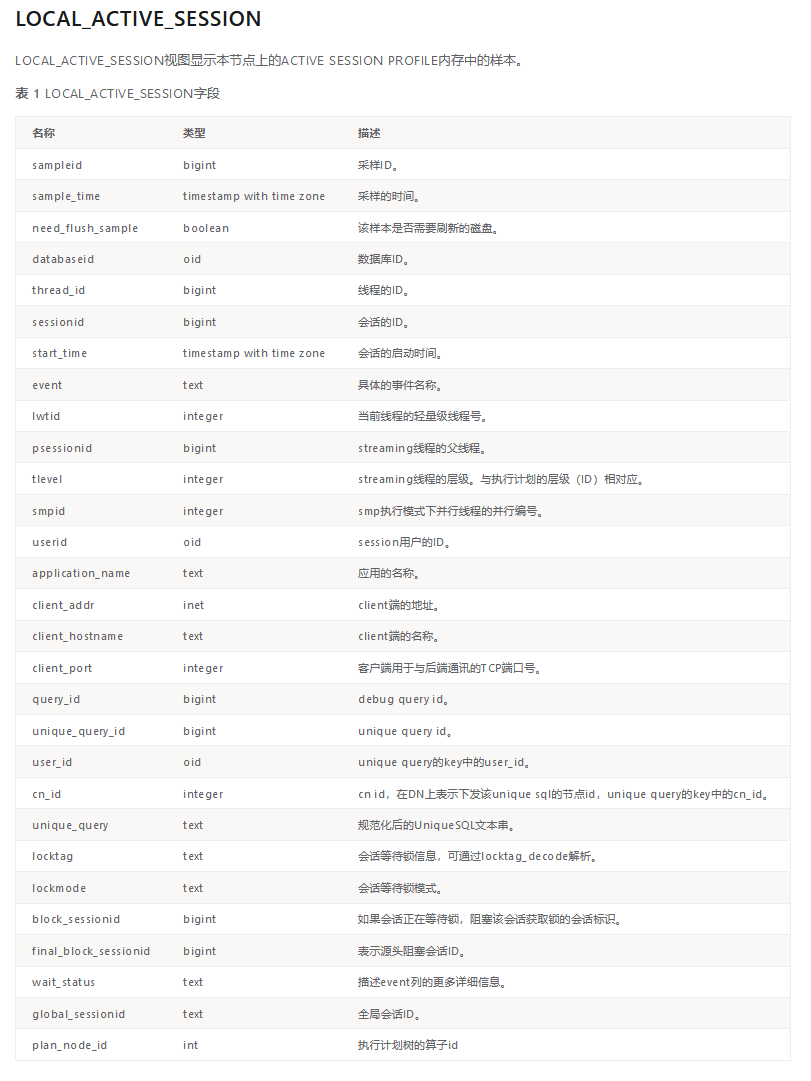
该视图中已经记录了大量信息,包括用户关心的会话ID,等待事件,SQL query id (该值可以跟dbe_perf.statement_history表或者dbe_perf.statement_complex_runtime表进行关联,获取SQL的文本和执行计划)。

image-20221024155531233

以上字段列表中,plan_node_id只有在MogDB企业版数据库中才存在,openGauss社区开源版本不存在该字段。

关于SQL执行计划的记录

查询已经运行过的,或者正在执行的SQL的执行计划,是数据库运维工作中经常会遇到的需求。在MogDB中,以下视图中记录了SQL的执行计划。

dbe_perf.STATEMENT_HISTORY 该视图中记录了已经运行结束的SQL的各种信息,同时包含了执行计划(query_plan字段)。

dbe_perf.STATEMENT_COMPLEX_RUNTIME 该视图中记录了正在运行的SQL的各种信息,同时包含了执行计划(query_plan字段)。

但是要注意,记录SQL的执行计划,受到以下参数影响。

enable_resource_track 该参数设置是否对资源进行监控,默认为on,如果设置为off,则不仅仅是执行计划,而是所有用户SQL的执行信息都不再追踪。包括在ASH视图LOCAL_ACTIVE_SESSION中也不再记录用户会话采样。

resource_track_cost 该参数设置对于SQL语句进行资源监控的最小执行代价,只有高于该参数值的成本的SQL才会记录执行计划。

一个综合各种视图的查询语句

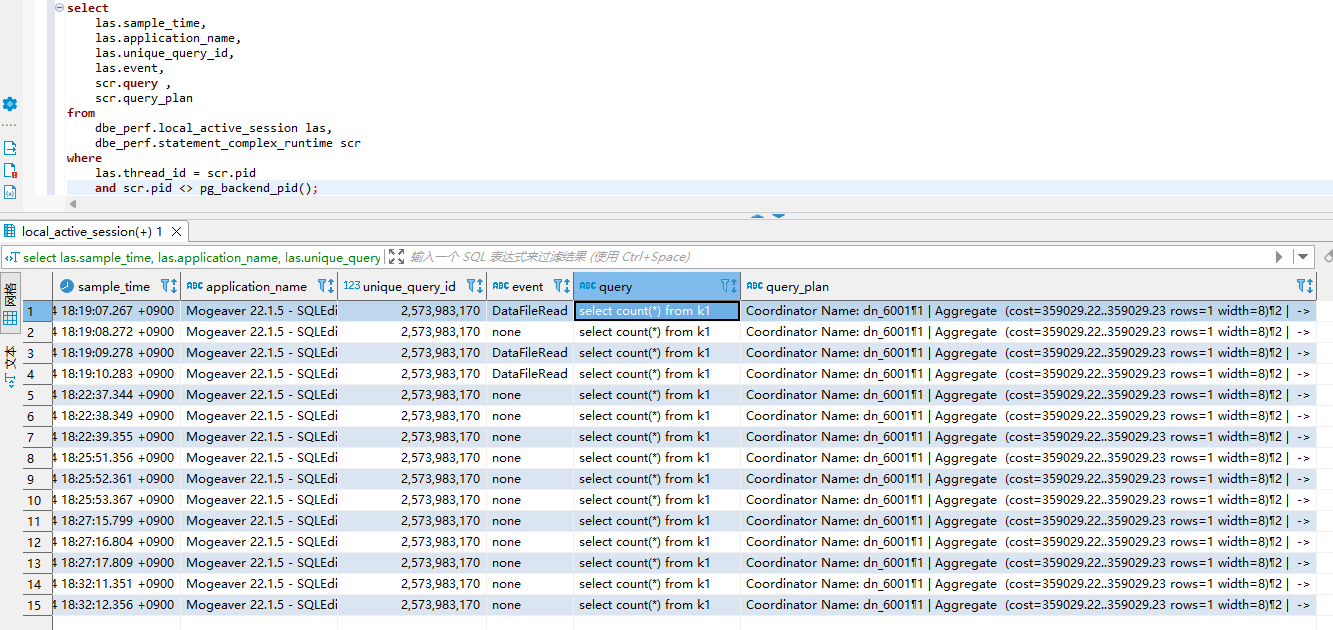
我们可以使用以下语句来获取正在执行的SQL的包括历史采样的所有信息。

select
las.sample_time,
las.application_name,
las.unique_query_id,
las.event,
scr.query ,
scr.query_plan
from
dbe_perf.local_active_session las,
dbe_perf.statement_complex_runtime scr
where
las.thread_id = scr.pid
and scr.pid <> pg_backend_pid();

该SQL执行的结果示例如下。这个例子中有一个全表扫描的语句频繁执行,在多次采样中被记录下来,包含了SQL文本,执行计划,发起查询的客户端信息等,均可以查询到。这些信息将对性能诊断提供极大帮助。

image-20221024183300024

Use PTK to install MogDB 3.0 on Oracle Enterprise Linux 8.6

Which MogDB version and OS version was supported?

[root@localhost ~]# ptk candidate mogdb-server
  software   | version  
---------------+----------
MogDB-Server | 3.0.0    
              | 2.1.1    
              | 2.0.3    
              | 2.0.1    
              | 2.0.0    
[root@localhost ~]# ptk candidate os
software |           version              
-----------+---------------------------------
OS       | UOS 20 (arm64)                  
          | UOS 20 (x86_64)                
          | CentOS 8 (arm64)                
          | CentOS 7 (x86_64)              
          | CentOS 8 (x86_64)              
          | EulerOS 2 (arm64)              
          | EulerOS 2 (x86_64)                            
          | Kylin V10 (arm64)              
          | Kylin V10 (x86_64)              
          | Oracle Linux Server 7 (x86_64)  
          | Oracle Linux Server 8 (x86_64)  
          | openEuler 20 (arm64)            
          | openEuler 22 (arm64)            
          | openEuler 20 (x86_64)          
          | openEuler 22 (x86_64)          
          | RedHat 7 (x86_64)              
          | Rocky Linux 7 (x86_64)          
          | Rocky Linux 8 (x86_64)          
          | SLES 12 (arm64)                
          | Ubuntu 18 (x86_64)            

Which OS version is using?

[root@localhost ~]# cat /etc/os-release 
NAME="Oracle Linux Server"
VERSION="8.6"
ID="ol"
ID_LIKE="fedora"
VARIANT="Server"
VARIANT_ID="server"
VERSION_ID="8.6"
PLATFORM_ID="platform:el8"
PRETTY_NAME="Oracle Linux Server 8.6"
ANSI_COLOR="0;31"
CPE_NAME="cpe:/o:oracle:linux:8:6:server"
HOME_URL="https://linux.oracle.com/"
BUG_REPORT_URL="https://bugzilla.oracle.com/"

ORACLE_BUGZILLA_PRODUCT="Oracle Linux 8"
ORACLE_BUGZILLA_PRODUCT_VERSION=8.6
ORACLE_SUPPORT_PRODUCT="Oracle Linux"
ORACLE_SUPPORT_PRODUCT_VERSION=8.6

Install PTK

[root@localhost ~]# curl --proto '=https' --tlsv1.2 -sSf https://cdn-mogdb.enmotech.com/ptk/install.sh | sh
info: downloading ptk package
Detected shell: bash
Shell profile: /root/.bash_profile
ptk has been added to PATH in /root/.bash_profile
open a new terminal or source /root/.bash_profile to active it
Installed path: /root/.ptk/bin/ptk
[root@localhost ~]# source /root/.bash_profile

Check OS

Make sure has no “Abnormal” items, all the “WARNING” items can be ignored in testing environment.

Check.

[root@localhost ~]# ptk checkos
INFO[2022-07-04T06:51:04.120] local ip: 192.168.122.21                    
[host 192.168.122.21]: not found package: numactl
Please installed the above missing packages first before do other operations
[PTK-4010] the system does not meet installation requirements

Install numactl.

[root@localhost ~]# dnf install numactl
Oracle Linux 8 BaseOS Latest (x86_64)                                                                                           22 MB/s | 47 MB     00:02    
Oracle Linux 8 Application Stream (x86_64)                                                                                       24 MB/s | 37 MB     00:01    
Latest Unbreakable Enterprise Kernel Release 6 for Oracle Linux 8 (x86_64)                                                       20 MB/s | 50 MB     00:02    
Last metadata expiration check: 0:00:09 ago on Mon 04 Jul 2022 06:52:47 AM EDT.
Dependencies resolved.
================================================================================================================================================================
Package                           Architecture                     Version                                   Repository                                   Size
================================================================================================================================================================
Installing:
numactl                           x86_64                           2.0.12-13.el8                             ol8_baseos_latest                           76 k

Transaction Summary
================================================================================================================================================================
Install 1 Package

Total download size: 76 k
Installed size: 161 k
Is this ok [y/N]: y
Downloading Packages:
numactl-2.0.12-13.el8.x86_64.rpm                                                                                               637 kB/s | 76 kB     00:00    
----------------------------------------------------------------------------------------------------------------------------------------------------------------
Total                                                                                                                           624 kB/s | 76 kB     00:00    
Oracle Linux 8 BaseOS Latest (x86_64)                                                                                           3.0 MB/s | 3.1 kB     00:00    
Importing GPG key 0xAD986DA3:
Userid     : "Oracle OSS group (Open Source Software group) <build@oss.oracle.com>"
Fingerprint: 76FD 3DB1 3AB6 7410 B89D B10E 8256 2EA9 AD98 6DA3
From       : /etc/pki/rpm-gpg/RPM-GPG-KEY-oracle
Is this ok [y/N]: y
Key imported successfully
Running transaction check
Transaction check succeeded.
Running transaction test
Transaction test succeeded.
Running transaction
Preparing       :                                                                                                                                       1/1
Installing       : numactl-2.0.12-13.el8.x86_64                                                                                                           1/1
Running scriptlet: numactl-2.0.12-13.el8.x86_64                                                                                                           1/1
Verifying       : numactl-2.0.12-13.el8.x86_64                                                                                                           1/1

Installed:
numactl-2.0.12-13.el8.x86_64                                                                                                                                  

Complete!

Check again.

[root@localhost ~]# ptk checkos
INFO[2022-07-04T06:53:27.021] local ip: 192.168.122.21                    
INFO[2022-07-04T06:53:36.264] platform: ol_8.6_64bit                       host=192.168.122.21
INFO[2022-07-04T06:53:36.268] kernel version: 5.4.17-2136.307.3.1.el8uek.x86_64 host=192.168.122.21
INFO[2022-07-04T06:53:36.359] locale: LANG=en_US.UTF-8                     host=192.168.122.21
INFO[2022-07-04T06:53:36.364] timezone: -0400                               host=192.168.122.21
INFO[2022-07-04T06:53:36.368] swap memory 2154492kB, total memory 1734880kB host=192.168.122.21
WARN[2022-07-04T06:53:36.382] net.ipv4.tcp_tw_reuse=2, expect 1             host=192.168.122.21
WARN[2022-07-04T06:53:36.389] net.ipv4.tcp_retries1=3, expect 5             host=192.168.122.21
WARN[2022-07-04T06:53:36.394] net.ipv4.tcp_max_syn_backlog=128, expect 65535 host=192.168.122.21
WARN[2022-07-04T06:53:36.398] net.ipv4.tcp_syn_retries=6, expect 5         host=192.168.122.21
WARN[2022-07-04T06:53:36.402] net.core.wmem_max=212992, expect 21299200     host=192.168.122.21
WARN[2022-07-04T06:53:36.406] net.core.wmem_default=212992, expect 21299200 host=192.168.122.21
WARN[2022-07-04T06:53:36.410] net.ipv4.tcp_max_tw_buckets=8192, expect 10000 host=192.168.122.21
WARN[2022-07-04T06:53:36.414] net.core.rmem_default=212992, expect 21299200 host=192.168.122.21
WARN[2022-07-04T06:53:36.418] kernel.sem=32000 1024000000 500 32000, expect 250 6400000 1000 25600 host=192.168.122.21
WARN[2022-07-04T06:53:36.435] net.core.netdev_max_backlog=1000, expect 65535 host=192.168.122.21
WARN[2022-07-04T06:53:36.438] net.core.rmem_max=212992, expect 21299200     host=192.168.122.21
WARN[2022-07-04T06:53:36.448] vm.min_free_kbytes=45056, expect 86744       host=192.168.122.21
WARN[2022-07-04T06:53:36.457] net.ipv4.tcp_keepalive_intvl=75, expect 30   host=192.168.122.21
WARN[2022-07-04T06:53:36.461] net.ipv4.tcp_rmem=4096 131072 6291456, expect 8192 250000 16777216 host=192.168.122.21
WARN[2022-07-04T06:53:36.473] net.core.somaxconn=4096, expect 65535         host=192.168.122.21
WARN[2022-07-04T06:53:36.478] net.ipv4.tcp_keepalive_time=7200, expect 30   host=192.168.122.21
WARN[2022-07-04T06:53:36.481] net.ipv4.tcp_retries2=15, expect 12           host=192.168.122.21
WARN[2022-07-04T06:53:36.490] net.ipv4.tcp_wmem=4096 16384 4194304, expect 8192 250000 16777216 host=192.168.122.21
WARN[2022-07-04T06:53:36.637] device(/dev/vda) readahead value=8192, expect 16384. host=192.168.122.21
WARN[2022-07-04T06:53:36.661] device(sr0) 'IO Request'=64, expect 512       host=192.168.122.21
WARN[2022-07-04T06:53:36.661] device(vda) 'IO Request'=256, expect 512     host=192.168.122.21
WARN[2022-07-04T06:53:36.661] device(dm-0) 'IO Request'=128, expect 512     host=192.168.122.21
WARN[2022-07-04T06:53:36.661] device(dm-1) 'IO Request'=128, expect 512     host=192.168.122.21
WARN[2022-07-04T06:53:36.669] device(vda) 'IO scheduler'='none', expect 'mq-deadline' host=192.168.122.21
WARN[2022-07-04T06:53:36.681] not found network conf file for enp1s0 in dir /etc/sysconfig/network, skip check bonding host=192.168.122.21
WARN[2022-07-04T06:53:36.710] network card(enp1s0): mtu=1500, expect 8192   host=192.168.122.21
ERRO[2022-07-04T06:53:36.721] transparent_hugepage status is 'always', expect 'never' host=192.168.122.21
INFO[2022-07-04T06:53:45.839] write fix os script to root_fix_os.sh successfully
INFO[2022-07-04T06:53:45.839] all checkers finished                        
# Check Results
              Item               | Level    
------------------------------------+-----------
A1.Check_OS_Version               | OK        
A2.Check_Kernel_Version           | OK        
A3.Check_Unicode                 | OK        
A4.Check_TimeZone                 | OK        
A5.Check_Swap_Memory_Configure   | Warning  
A6.Check_SysCtl_Parameter         | Warning  
A7.Check_FileSystem_Configure     | OK        
A8.Check_Disk_Configure           | OK        
A9.Check_BlockDev_Configure       | Warning  
A9.Check_Logical_Block           | OK        
A10.Check_IO_Configure           | Warning  
A10.Check_IO_Request             | Warning  
A10.Check_Asynchronous_IO_Request | OK        
A11.Check_Network_Configure       | Warning  
A12.Check_Time_Consistency       | OK        
A13.Check_Firewall_Service       | OK        
A14.Check_THP_Service             | Abnormal  
A15.Check_Dependent_Package       | Warning  
A16.Check_CPU_Instruction_Set     | OK        
Total count 19, abnormal count 1, warning count 7

Failed to check os, can’t perform installation unless fix all the abnormal items
You can use 'ptk checkos -i ITEM --detail' to see detail message
Please check root_fix_os.sh for commands to resolve.

Disable TPH. the command can be find in root_fix_os.sh generated by PTK.

[root@localhost ~]# [ -f /sys/kernel/mm/transparent_hugepage/enabled ] && echo 'never' | sudo tee /sys/kernel/mm/transparent_hugepage/enabled
never

Check again.

[root@localhost ~]# ptk checkos
INFO[2022-07-04T06:57:55.973] local ip: 192.168.122.21                    
INFO[2022-07-04T06:58:05.230] platform: ol_8.6_64bit                       host=192.168.122.21
INFO[2022-07-04T06:58:05.234] kernel version: 5.4.17-2136.307.3.1.el8uek.x86_64 host=192.168.122.21
INFO[2022-07-04T06:58:05.324] locale: LANG=en_US.UTF-8                     host=192.168.122.21
INFO[2022-07-04T06:58:05.329] timezone: -0400                               host=192.168.122.21
INFO[2022-07-04T06:58:05.333] swap memory 2154492kB, total memory 1734880kB host=192.168.122.21
WARN[2022-07-04T06:58:05.338] net.core.wmem_max=212992, expect 21299200     host=192.168.122.21
WARN[2022-07-04T06:58:05.342] net.ipv4.tcp_max_tw_buckets=8192, expect 10000 host=192.168.122.21
WARN[2022-07-04T06:58:05.355] net.core.netdev_max_backlog=1000, expect 65535 host=192.168.122.21
WARN[2022-07-04T06:58:05.359] net.ipv4.tcp_retries1=3, expect 5             host=192.168.122.21
WARN[2022-07-04T06:58:05.362] net.ipv4.tcp_wmem=4096 16384 4194304, expect 8192 250000 16777216 host=192.168.122.21
WARN[2022-07-04T06:58:05.366] net.core.wmem_default=212992, expect 21299200 host=192.168.122.21
WARN[2022-07-04T06:58:05.378] kernel.sem=32000 1024000000 500 32000, expect 250 6400000 1000 25600 host=192.168.122.21
WARN[2022-07-04T06:58:05.382] net.ipv4.tcp_max_syn_backlog=128, expect 65535 host=192.168.122.21
WARN[2022-07-04T06:58:05.392] net.core.somaxconn=4096, expect 65535         host=192.168.122.21
WARN[2022-07-04T06:58:05.396] net.core.rmem_max=212992, expect 21299200     host=192.168.122.21
WARN[2022-07-04T06:58:05.399] net.core.rmem_default=212992, expect 21299200 host=192.168.122.21
WARN[2022-07-04T06:58:05.408] net.ipv4.tcp_tw_reuse=2, expect 1             host=192.168.122.21
WARN[2022-07-04T06:58:05.412] net.ipv4.tcp_keepalive_time=7200, expect 30   host=192.168.122.21
WARN[2022-07-04T06:58:05.416] net.ipv4.tcp_rmem=4096 131072 6291456, expect 8192 250000 16777216 host=192.168.122.21
WARN[2022-07-04T06:58:05.420] net.ipv4.tcp_syn_retries=6, expect 5         host=192.168.122.21
WARN[2022-07-04T06:58:05.432] net.ipv4.tcp_keepalive_intvl=75, expect 30   host=192.168.122.21
WARN[2022-07-04T06:58:05.437] net.ipv4.tcp_retries2=15, expect 12           host=192.168.122.21
WARN[2022-07-04T06:58:05.452] vm.min_free_kbytes=45056, expect 86744       host=192.168.122.21
WARN[2022-07-04T06:58:05.586] device(/dev/vda) readahead value=8192, expect 16384. host=192.168.122.21
WARN[2022-07-04T06:58:05.609] device(dm-0) 'IO Request'=128, expect 512     host=192.168.122.21
WARN[2022-07-04T06:58:05.609] device(dm-1) 'IO Request'=128, expect 512     host=192.168.122.21
WARN[2022-07-04T06:58:05.609] device(sr0) 'IO Request'=64, expect 512       host=192.168.122.21
WARN[2022-07-04T06:58:05.609] device(vda) 'IO Request'=256, expect 512     host=192.168.122.21
WARN[2022-07-04T06:58:05.616] device(vda) 'IO scheduler'='none', expect 'mq-deadline' host=192.168.122.21
WARN[2022-07-04T06:58:05.627] not found network conf file for enp1s0 in dir /etc/sysconfig/network, skip check bonding host=192.168.122.21
WARN[2022-07-04T06:58:05.653] network card(enp1s0): mtu=1500, expect 8192   host=192.168.122.21
INFO[2022-07-04T06:58:14.838] write fix os script to root_fix_os.sh successfully
INFO[2022-07-04T06:58:14.839] all checkers finished                        
# Check Results
              Item               | Level  
------------------------------------+----------
A1.Check_OS_Version               | OK      
A2.Check_Kernel_Version           | OK      
A3.Check_Unicode                 | OK      
A4.Check_TimeZone                 | OK      
A5.Check_Swap_Memory_Configure   | Warning  
A6.Check_SysCtl_Parameter         | Warning  
A7.Check_FileSystem_Configure     | OK      
A8.Check_Disk_Configure           | OK      
A9.Check_BlockDev_Configure       | Warning  
A9.Check_Logical_Block           | OK      
A10.Check_Asynchronous_IO_Request | OK      
A10.Check_IO_Configure           | Warning  
A10.Check_IO_Request             | Warning  
A11.Check_Network_Configure       | Warning  
A12.Check_Time_Consistency       | OK      
A13.Check_Firewall_Service       | OK      
A14.Check_THP_Service             | OK      
A15.Check_Dependent_Package       | Warning  
A16.Check_CPU_Instruction_Set     | OK      
Total count 19, abnormal count 0, warning count 7

Generate config file

If this is the newly installation in a new OS, no need to modify anything, just keep all the default settings.

[root@localhost ~]# ptk template --local > config.yaml
[root@localhost ~]# cat config.yaml
global:
# # cluster name (required)
cluster_name: "cluster_xWsybr"
# # system user for running db
user: "omm"
# # system user group, same as username if not given
group: "omm"
# # base directory for install MogDB server,
# # if any of app_dir,data_dir,log_dir and tool_dir not config,
# # PTK will create corresponding directory under base_dir
base_dir: "/opt/mogdb"

db_servers:
- host: "127.0.0.1"
  # # database port
  db_port: 26000

Install MogDB 3.0

PTK will download MogDB for openEuler image in all the Fedora like OS from version 8. Please make sure you are using the latest ptk by using ptk self upgrade. PTK is being developed very actively, Upgrading PTK every few days is recommend.

[root@localhost ~]# ptk self upgrade
INFO[2022-07-04T08:29:16.082] start download ptk_linux_x86_64.tar.gz      
> download ptk_linux_x86_64.t...: 3.93 MiB / 3.93 MiB [------------------------------------------------------------------------------] 100.00% 3.83 MiB p/s 1.2s
INFO[2022-07-04T08:29:22.006] download ptk_linux_x86_64.tar.gz successfully
INFO[2022-07-04T08:29:22.122] upgrade ptk successfully  

[root@localhost ~]# ptk -v
PTK Version: v0.2.2
Go Version: go1.17.1
Build Date: 2022-07-04T12:18:21Z
Git Hash: 5959dd0
[root@localhost ~]# ptk install -f config.yaml
Please enter db password (8~16 characters):
Retype db password:
=============================
global:
cluster_name: cluster_xWsybr
user: omm
group: omm
app_dir: /opt/mogdb/app
data_dir: /opt/mogdb/data
log_dir: /opt/mogdb/log
tool_dir: /opt/mogdb/tool
tmp_dir: /opt/mogdb/tmp
db_servers:
- host: 192.168.122.21
db_port: 26000
role: primary
az_name: AZ1
az_priority: 1

=============================
Is cluster topo correct?[Y|Yes](default=N) Y
INFO[2022-07-04T08:32:54.640] no package specified, use online package: https://cdn-mogdb.enmotech.com/mogdb-media/3.0.0/MogDB-3.0.0-openEuler-x86_64.tar.gz
INFO[2022-07-04T08:32:54.641] downloading package...                      
> download MogDB-3.0.0-openEu...: 134.20 MiB / 134.20 MiB [---------------------------------------------------------------------------] 100.00% 9.02 MiB p/s 15s
INFO[2022-07-04T08:33:13.597] download package successfully                
WARN[2022-07-04T08:33:14.463] vendor does not provide sha256 file for MogDB-3.0.0-openEuler-64bit-Libpq, skip validate
WARN[2022-07-04T08:33:14.529] vendor does not provide sha256 file for MogDB-3.0.0-openEuler-64bit-tools, skip validate
INFO[2022-07-04T08:33:14.871] the installation package files are safe      
INFO[2022-07-04T08:33:14.871] parse version.cfg from MogDB-3.0.0-openEuler-64bit.tar.gz
INFO[2022-07-04T08:33:17.386] detected db version: MogDB-3.0.0, number: 92.605, commit_id: 62408a0f
WARN[2022-07-04T08:33:17.394] the number of instances is less than 3, CM will not be installed
INFO[2022-07-04T08:33:17.394] start check operating system                
INFO[2022-07-04T08:33:17.394] local ip: 192.168.122.21                    
INFO[2022-07-04T08:33:26.605] platform: ol_8.6_64bit                       host=192.168.122.21
INFO[2022-07-04T08:33:26.610] kernel version: 5.4.17-2136.307.3.1.el8uek.x86_64 host=192.168.122.21
INFO[2022-07-04T08:33:26.702] locale: LANG=en_US.UTF-8                     host=192.168.122.21
INFO[2022-07-04T08:33:26.708] timezone: -0400                               host=192.168.122.21
INFO[2022-07-04T08:33:26.714] swap memory 2154492kB, total memory 1734880kB host=192.168.122.21
WARN[2022-07-04T08:33:26.724] net.ipv4.tcp_syn_retries=6, expect 5         host=192.168.122.21
WARN[2022-07-04T08:33:26.735] net.ipv4.tcp_rmem=4096 131072 6291456, expect 8192 250000 16777216 host=192.168.122.21
WARN[2022-07-04T08:33:26.744] net.ipv4.tcp_max_syn_backlog=128, expect 65535 host=192.168.122.21
WARN[2022-07-04T08:33:26.754] net.core.rmem_max=212992, expect 21299200     host=192.168.122.21
WARN[2022-07-04T08:33:26.759] net.core.wmem_default=212992, expect 21299200 host=192.168.122.21
WARN[2022-07-04T08:33:26.764] net.core.rmem_default=212992, expect 21299200 host=192.168.122.21
WARN[2022-07-04T08:33:26.776] vm.min_free_kbytes=45056, expect 86744       host=192.168.122.21
WARN[2022-07-04T08:33:26.790] net.ipv4.tcp_keepalive_intvl=75, expect 30   host=192.168.122.21
WARN[2022-07-04T08:33:26.800] net.ipv4.tcp_retries2=15, expect 12           host=192.168.122.21
WARN[2022-07-04T08:33:26.804] net.core.wmem_max=212992, expect 21299200     host=192.168.122.21
WARN[2022-07-04T08:33:26.809] net.ipv4.tcp_keepalive_time=7200, expect 30   host=192.168.122.21
WARN[2022-07-04T08:33:26.813] net.ipv4.tcp_retries1=3, expect 5             host=192.168.122.21
WARN[2022-07-04T08:33:26.818] net.ipv4.tcp_wmem=4096 16384 4194304, expect 8192 250000 16777216 host=192.168.122.21
WARN[2022-07-04T08:33:26.823] net.core.somaxconn=4096, expect 65535         host=192.168.122.21
WARN[2022-07-04T08:33:26.832] net.ipv4.tcp_max_tw_buckets=8192, expect 10000 host=192.168.122.21
WARN[2022-07-04T08:33:26.844] net.core.netdev_max_backlog=1000, expect 65535 host=192.168.122.21
WARN[2022-07-04T08:33:26.848] kernel.sem=32000 1024000000 500 32000, expect 250 6400000 1000 25600 host=192.168.122.21
WARN[2022-07-04T08:33:26.857] net.ipv4.tcp_tw_reuse=2, expect 1             host=192.168.122.21
WARN[2022-07-04T08:33:26.993] device(/dev/vda) readahead value=8192, expect 16384. host=192.168.122.21
WARN[2022-07-04T08:33:27.018] device(vda) 'IO Request'=256, expect 512     host=192.168.122.21
WARN[2022-07-04T08:33:27.018] device(dm-0) 'IO Request'=128, expect 512     host=192.168.122.21
WARN[2022-07-04T08:33:27.018] device(dm-1) 'IO Request'=128, expect 512     host=192.168.122.21
WARN[2022-07-04T08:33:27.018] device(sr0) 'IO Request'=64, expect 512       host=192.168.122.21
WARN[2022-07-04T08:33:27.026] device(vda) 'IO scheduler'='none', expect 'mq-deadline' host=192.168.122.21
WARN[2022-07-04T08:33:27.082] network card(enp1s0): mtu=1500, expect 8192   host=192.168.122.21
WARN[2022-07-04T08:33:27.102] the firewall service status='enabled', expect 'disabled'. host=192.168.122.21
INFO[2022-07-04T08:33:36.128] [stage=precheck]: start                       host=192.168.122.21
INFO[2022-07-04T08:33:36.128] check core pattern value                     host=192.168.122.21
INFO[2022-07-04T08:33:36.136] check RemoveIPC value                         host=192.168.122.21
INFO[2022-07-04T08:33:36.142] check user 'omm'                             host=192.168.122.21
INFO[2022-07-04T08:33:36.151] check port 26000                             host=192.168.122.21
INFO[2022-07-04T08:33:36.211] port 26000 is free                           host=192.168.122.21
INFO[2022-07-04T08:33:36.212] [stage=precheck]: successful                 host=192.168.122.21
INFO[2022-07-04T08:33:36.212] scp file from /root/.ptk/cache/MogDB-3.0.0-openEuler-x86_64.tar.gz to 192.168.122.21:/tmp/MogDB-3.0.0-openEuler-x86_64.tar.gz host=192.168.122.21
INFO[2022-07-04T08:33:36.316] [stage=initial]: start                       host=192.168.122.21
INFO[2022-07-04T08:33:36.323] total memory(1GB) is less then 4GB, use default guc config host=192.168.122.21
INFO[2022-07-04T08:33:36.323] create os user omm, group omm                 host=192.168.122.21
INFO[2022-07-04T08:33:37.440] set ulimits                                   host=192.168.122.21
INFO[2022-07-04T08:33:37.444] set user omm profiles                         host=192.168.122.21
INFO[2022-07-04T08:33:37.611] add c library /usr/local/lib to /etc/ld.so.conf.d/libc.conf host=192.168.122.21
INFO[2022-07-04T08:33:37.616] mkdir /opt/mogdb/tool                         host=192.168.122.21
INFO[2022-07-04T08:33:37.774] decompress MogDB-3.0.0-openEuler-x86_64.tar.gz to dir /opt/mogdb/tool host=192.168.122.21
INFO[2022-07-04T08:33:38.809] remove files /tmp/MogDB-3.0.0-openEuler-x86_64.tar.gz host=192.168.122.21
INFO[2022-07-04T08:33:38.826] decompress *-om.tar.gz to dir /opt/mogdb/tool host=192.168.122.21
INFO[2022-07-04T08:33:39.228] change /opt/mogdb/tool owner to omm           host=192.168.122.21
INFO[2022-07-04T08:33:39.239] mkdir /opt/mogdb/app                         host=192.168.122.21
INFO[2022-07-04T08:33:39.384] decompress MogDB-3.0.0-openEuler-64bit.tar.gz to dir /opt/mogdb/app host=192.168.122.21
INFO[2022-07-04T08:33:42.089] change /opt/mogdb/app owner to omm           host=192.168.122.21
INFO[2022-07-04T08:33:42.101] mkdir /opt/mogdb/log/gs_profile,/opt/mogdb/log/pg_log,/opt/mogdb/log/pg_audit,/opt/mogdb/log/bin,/opt/mogdb/log/pg_log/dn_6001,/opt/mogdb/log/pg_audit/dn_6001 host=192.168.122.21
INFO[2022-07-04T08:33:43.382] mkdir /opt/mogdb/tmp                         host=192.168.122.21
INFO[2022-07-04T08:33:43.523] save version to /opt/mogdb/app/bin/upgrade_version host=192.168.122.21
INFO[2022-07-04T08:33:43.595] create cluster_manual_start file             host=192.168.122.21
INFO[2022-07-04T08:33:43.660] generate static config to /opt/mogdb/app/bin/cluster_static_config host=192.168.122.21
INFO[2022-07-04T08:33:43.668] change /opt/mogdb/app/bin/cluster_static_config owner to omm host=192.168.122.21
INFO[2022-07-04T08:33:43.672] mkdir /opt/mogdb/data                         host=192.168.122.21
INFO[2022-07-04T08:33:43.812] change /opt/mogdb/data owner to omm           host=192.168.122.21
INFO[2022-07-04T08:33:43.816] initial database                             host=192.168.122.21
INFO[2022-07-04T08:33:59.488] set 192.168.122.21 postgresql.conf           host=192.168.122.21
INFO[2022-07-04T08:33:59.603] set 192.168.122.21 hba config                 host=192.168.122.21
INFO[2022-07-04T08:33:59.684] [stage=initial]: successful                   host=192.168.122.21
INFO[2022-07-04T08:33:59.684] [stage=launch]: start                         host=192.168.122.21
INFO[2022-07-04T08:33:59.684] start 192.168.122.21 database by gs_ctl       host=192.168.122.21
INFO[2022-07-04T08:34:00.805] alter initial user password                   host=192.168.122.21
INFO[2022-07-04T08:34:00.981] [stage=launch]: successful                   host=192.168.122.21
      host     | stage |   status     | message  
-----------------+--------+---------------+----------
192.168.122.21 | launch | start_success | success  
[root@localhost ~]# ptk ls
  cluster_name |     instances       | user |   data_dir     | db_version  
-----------------+----------------------+------+-----------------+--------------
cluster_xWsybr | 192.168.122.21:26000 | omm | /opt/mogdb/data | MogDB-3.0.0  
[root@localhost ~]# ptk cluster status -n cluster_xWsybr

[   Cluster State   ]

database_version : MogDB-3.0.0
cluster_name : cluster_xWsybr
cluster_state   : Normal
current_az     : AZ_ALL

[ Datanode State   ]

  id |       ip       | port | user | instance | db_role | state  
-------+----------------+-------+------+----------+---------+---------
6001 | 192.168.122.21 | 26000 | omm | dn_6001 | Normal | Normal  

Install and use mogila sample database

It maybe takes more than 1 minute to complete the entire data manipulation works depending on the system configuration.

[root@localhost ~]# su - omm
[omm@localhost ~]$ git clone https://gitee.com/enmotech/mogila.git
Cloning into 'mogila'...
remote: Enumerating objects: 145, done.
remote: Counting objects: 100% (3/3), done.
remote: Compressing objects: 100% (3/3), done.
remote: Total 145 (delta 0), reused 0 (delta 0), pack-reused 142
Receiving objects: 100% (145/145), 4.25 MiB | 1.88 MiB/s, done.
Resolving deltas: 100% (73/73), done.
[omm@localhost ~]$ cd mogila/
[omm@localhost mogila]$ gsql -d postgres -p 26000 -c "create database mogila DBCOMPATIBILITY='PG'"
CREATE DATABASE
[omm@localhost mogila]$ gsql -d postgres -p 26000 -c "create user mogdb password 'Enmo@123'"
CREATE ROLE
[omm@localhost mogila]$ gsql -d postgres -p 26000 -c "alter user mogdb with sysadmin"
ALTER ROLE
[omm@localhost mogila]$ gsql -d mogila -p 26000 -f mogila-insert-data.sql
total time: 89570 ms
[omm@localhost mogila]$
[omm@localhost mogila]$ gsql -d mogila -p 26000 -U mogdb -W Enmo@123 -r
gsql ((MogDB 3.0.0 build 62408a0f) compiled at 2022-06-30 14:21:32 commit 0 last mr )
Non-SSL connection (SSL connection is recommended when requiring high-security)
Type "help" for help.

mogila=> select version();
                                                                    version                                                                      
--------------------------------------------------------------------------------------------------------------------------------------------------
(MogDB 3.0.0 build 62408a0f) compiled at 2022-06-30 14:21:32 commit 0 last mr   on x86_64-unknown-linux-gnu, compiled by g++ (GCC) 7.3.0, 64-bit
(1 row)

Install compat-tools to get more Oracle database compatibilities

[omm@localhost ~]$ cd
[omm@localhost ~]$ git clone https://gitee.com/enmotech/compat-tools.git
Cloning into 'compat-tools'...
remote: Enumerating objects: 1100, done.
remote: Counting objects: 100% (208/208), done.
remote: Compressing objects: 100% (190/190), done.
remote: Total 1100 (delta 138), reused 35 (delta 18), pack-reused 892
Receiving objects: 100% (1100/1100), 1.45 MiB | 1.95 MiB/s, done.
Resolving deltas: 100% (698/698), done.

[omm@localhost ~]$ cd compat-tools/
[omm@localhost compat-tools]$ gsql -d mogila -p 26000 -f runMe.sql
gsql:runMe.sql:152: NOTICE:  
gsql:runMe.sql:152: NOTICE: -- =====================================================================
gsql:runMe.sql:152: NOTICE: -- Test Summary:
gsql:runMe.sql:152: NOTICE: -- =====================================================================
gsql:runMe.sql:152: NOTICE:     | result_type | case_count | start_time         | complete_time       |
gsql:runMe.sql:152: NOTICE:     |-------------|------------|---------------------|---------------------|
gsql:runMe.sql:152: NOTICE:     | PASSED     |       521 | 2022-07-04 13:10:49 | 2022-07-04 13:10:52 |
gsql:runMe.sql:152: NOTICE:  
gsql:runMe.sql:152: NOTICE: -- =====================================================================
gsql:runMe.sql:152: NOTICE: -- Test Detail (Failed or Null):
gsql:runMe.sql:152: NOTICE: -- =====================================================================
gsql:runMe.sql:152: NOTICE: -- <<< ALL SUCCEED >>>
ANONYMOUS BLOCK EXECUTE
total time: 4461 ms

[omm@localhost compat-tools]$ gsql -d mogila -p 26000 -U mogdb -W Enmo@123 -r
gsql ((MogDB 3.0.0 build 62408a0f) compiled at 2022-06-30 14:21:32 commit 0 last mr )
Non-SSL connection (SSL connection is recommended when requiring high-security)
Type "help" for help.

mogila=> select * from v$version;
                    banner                      
-------------------------------------------------
MogDB 3.0.0 build 62408a0f
compiled at 2022-06-30 14:21:32
Platform architecture: x86_64-unknown-linux-gnu
(3 rows)

mogila=> select table_name,num_rows,partitioned from user_tables;
table_name   | num_rows | partitioned
---------------+----------+-------------
ACTOR         |     200 | NO
CATEGORY     |       16 | NO
CUSTOMER     |     599 | NO
CITY         |     600 | NO
COUNTRY       |     109 | NO
LANGUAGE     |       6 | NO
FILM_ACTOR   |     5462 | NO
FILM_CATEGORY |     1000 | NO
FILM         |     1000 | NO
PAYMENT       |   16049 | YES
INVENTORY     |     4581 | NO
RENTAL       |   16044 | NO
STAFF         |       2 | NO
ADDRESS       |     603 | NO
STORE         |       2 | NO
(15 rows)

mogila=> select dbms_random.value(100,1000) from dual;
    value      
------------------
891.160552715883
(1 row)

mogila-> \q
[omm@localhost compat-tools]$