How to resolve ORA-01034 when RAC failover

今天在客户处测试Oracle 9.2.0.8 on HP-UX IA64的RAC Failover功能,遇到ORA-01034错误。

表现为:
当关闭RAC环境的某一个实例之后(无论是shutdown abort还是shutdown immediate),再用远程客户端通过tns连接RAC Service都会间歇性报ORA-01034错误。

$ sqlplus system/oracle@prod 

SQL*Plus: Release 9.2.0.8.0 - Production on Tue Nov 17 20:52:09 2009

Copyright (c) 1982, 2002, Oracle Corporation.  All rights reserved.

ERROR:
ORA-01034: ORACLE not available
ORA-27101: shared memory realm does not exist
HPUX-ia64 Error: 2: No such file or directory

客户端的TNS配置是很常规的客户端failover。

PROD  =
  (DESCRIPTION =
    (ADDRESS_LIST =
      (ADDRESS = (PROTOCOL = TCP)(HOST = VIP1)(PORT = 1521))
      (ADDRESS = (PROTOCOL = TCP)(HOST = VIP2)(PORT = 1521))
      (LOAD_BALANCE = yes)
    )
    (CONNECT_DATA =
      (SERVICE_NAME = prod)
      (FAILOVER_MODE=
       (TYPE=SELECT)
       (METHOD=BASIC))
    )
  )

纳闷许久,仔细检查服务器端的listener.ora配置,才发现设置了GLOBAL_DBNAME,这是对于还没有往本地监听动态注册服务名功能的Oracle8和Oracle7才需要设置,在Oracle9i之后,如果设置了该参数,将会导致Failover失败。

将listener.ora中的配置从:

SID_LIST_LISTENER_PROD2 =
  (SID_LIST =
    (SID_DESC =
      (GLOBAL_DBNAME=prod)
      (ORACLE_HOME = /oracle/product/9.2)
      (SID_NAME = prod2)
    )
  )

修改为:

SID_LIST_LISTENER_PROD2 =
  (SID_LIST =
    (SID_DESC =
      (ORACLE_HOME = /oracle/product/9.2)
      (SID_NAME = prod2)
    )
  )

再次测试Failover,一切正常。

结论:
1. 对于监听依然存在,然后数据库实例关闭的情况,必须是在监听中动态注册的服务,才可以实现Failover。
2. GLOBAL_DBNAME会影响Failover。
“Alter Database Recover” Vs “Recover Database”

操作系统版本:Solaris 5.8 Sparc 64bit
数据库版本:Oracle 9.2.0.1

一直以为”alter database recover”和”recover database”这两个命令除了前者是SQL命令后者是SQL*PLUS命令之外,其它都是相同的,实际上却有所出入。

在所有需要的归档日志都存在的相同前提下。alter database recover命令无法继续。

SQL> alter database recover using backup controlfile until cancel;
alter database recover using backup controlfile until cancel
*
ERROR at line 1:
ORA-00279: change 10402260063 generated at 10/31/2009 01:30:52 needed for
thread 1
ORA-00289: suggestion : /xf_arch1/log9565_1.arc
ORA-00280: change 10402260063 for thread 1 is in sequence #9565

但是recover database命令却可以让DBA继续输入log file的名称。

SQL> recover database using backup controlfile until cancel;
ORA-00279: change 10402260063 generated at 10/31/2009 01:30:52 needed for
thread 1
ORA-00289: suggestion : /xf_arch1/log9565_1.arc
ORA-00280: change 10402260063 for thread 1 is in sequence #9565


Specify log: {=suggested | filename | AUTO | CANCEL}
/xf_arch1/log9565_1.arc
ORA-00279: change 10402260063 generated at 10/30/2009 23:24:14 needed for
thread 2
ORA-00289: suggestion : /xf_arch1/log10763_2.arc
ORA-00280: change 10402260063 for thread 2 is in sequence #10763


Specify log: {=suggested | filename | AUTO | CANCEL}
/xf_arch1/log10763_2.arc
ORA-00279: change 10402782605 generated at 10/31/2009 06:21:30 needed for
thread 1
ORA-00289: suggestion : /xf_arch1/log9566_1.arc
ORA-00280: change 10402782605 for thread 1 is in sequence #9566
ORA-00278: log file '/xf_arch1/log9565_1.arc' no longer needed for this
recovery


Specify log: {=suggested | filename | AUTO | CANCEL}
CANCEL
Media recovery cancelled.
SQL> 
SQL> alter database open resetlogs;

Database altered.

在上例中如果要想alter database recover成功,需要如下的语法:

ALTER DATABASE RECOVER automatic database 
until change 10404040058 using backup controlfile;

或者:

alter database recover logfile '/xf_arch1/log9565_1.arc' using backup controlfile;

a) use ALTER DATABASE if you want to do the recoverying step by step, manually — issueing each and every single solitary command to recover the database (apply logfiles).
b) use the SQLPLUS ‘recover’ command to have sqlplus automate the steps in a) for you.

更加详细的描述可以参看AskTOM的解释

How to resolve ORA-15025 when creating ASM diskgroup on Solaris

操作系统版本:Solaris10 Sparc 64bit
数据库版本:Oracle 10.2.0.4

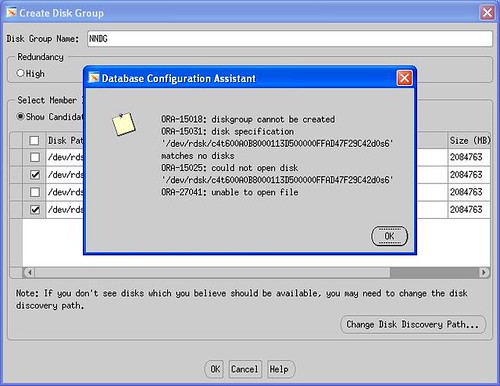
在创建ASM Diskgroup的时候出现如下图报错。

creating ASM diskgroup on Solaris10

检查当前系统裸设备的设置。

partition> p
Current partition table (original):
Total disk cylinders available: 53154 + 2 (reserved cylinders)

Part      Tag    Flag     Cylinders         Size            Blocks
  0       root    wm       0                0         (0/0/0)              0
  1       swap    wu       0                0         (0/0/0)              0
  2     backup    wu       0 - 53153        1.99TB    (53154/0/0) 4269595050
  3 unassigned    wm       0                0         (0/0/0)              0
  4 unassigned    wm       0                0         (0/0/0)              0
  5 unassigned    wm       0                0         (0/0/0)              0
  6        usr    wm       0 - 53153        1.99TB    (53154/0/0) 4269595050
  7 unassigned    wm       0                0         (0/0/0)              0

注意到被使用的裸设备d0s6的扇区划分是从0开始的,这在Solaris操作系统中将会导致Oracle无法读取该裸设备,因此引发了上面的错误。

解决方法是分配出一小部分空间给其它分区。比如分配100M给d0s3。

partition> p
Current partition table (unnamed):
Total disk cylinders available: 53154 + 2 (reserved cylinders)

Part      Tag    Flag     Cylinders         Size            Blocks
  0       root    wm       0                0         (0/0/0)              0
  1       swap    wu       0                0         (0/0/0)              0
  2     backup    wu       0 - 53153        1.99TB    (53154/0/0) 4269595050
  3 unassigned    wm       0 -     2      117.66MB    (3/0/0)         240975
  4 unassigned    wm       0                0         (0/0/0)              0
  5 unassigned    wm       0                0         (0/0/0)              0
  6        usr    wm       3 - 26112     1000.06GB    (26110/0/0) 2097285750
  7 unassigned    wm       0                0         (0/0/0)  

再次重新创建ASM磁盘组,成功。